My Solitaire-Card Game
- 4.7
- Rating
- 10.00K
- Installs
- Free
- Price
 Analysis by App-foxy
I found My Solitaire easy to understand from the first hand. It is a free card game from Misiona Puzzle, built around familiar Solitaire rules but with Joker moves, changing themes, and daily challenges to give the classic format a little more life. I approached it less like a quick store download and more like a game I might keep on my phone for quiet moments, so I paid attention to how comfortably it works when I am tired, distracted, or playing with one hand.
That perspective matters because Solitaire is often chosen for its simplicity. You do not want to learn a complicated control system before relaxing with a few cards. Here, the appeal is the recognizable structure: arrange cards, clear the tableau, and make decisions at a calm pace. The Joker element adds a useful escape from a difficult position, while themes and daily challenges offer reasons to return without turning the game into something noisy or overcomplicated.
My overall impression is positive, especially for people who want a straightforward card game rather than a competitive multiplayer experience. The 4.7 average from around 226 ratings suggests that the basic idea is connecting with players, and the game has passed 10K installs. Still, its strongest quality is not a large feature list. It is the way the familiar card layout lets me begin playing almost immediately.
You May Also Like

 AccuWeather: Weather Radar
AccuWeather Review: A Quick, Clear Forecast for Everyday Decisions
For everyday plans, the best forecast is the one you can understand quickly. AccuWeather makes rain timing, radar, and local conditions easy to act on, with a few trade-offs.

 Hill Climb Racing
Why Hill Climb Racing Still Turns Crashes Into One More Run
A tiny car, a bumpy hill and one more upgrade: Hill Climb Racing keeps resurfacing because its simple chaos makes every near-miss feel personal.

 AliExpress - Shopping App
AliExpress Makes Global Shopping Feel Personal, but Shoppers Bear the Risk
AliExpress turns a global marketplace into a pocket-sized discovery engine. Its reach is useful, its shopping loop compelling, and its trade-offs easy to miss.

 Lords Mobile: Kingdom Wars
Lords Mobile Is a Kingdom-Building Routine, Not a Quick Match
A case-by-case verdict on the building, battles, device demands, and social commitments that make Lords Mobile rewarding for some players and exhausting for others.

 PDF Scanner app - TapScanner
TapScanner Makes Paperwork Easier to Capture, Check, and Share
TapScanner makes scanning with a phone feel less like a rescue operation and more like a dependable step in getting work done. Its capture tools are useful, though not flawless.

 Block Blast!
 Shows How Much a Puzzle Game Can Leave Out
A quiet grid game shows why puzzle players increasingly value instant clarity, repeatable skill and low-pressure play—and where the genre still needs to catch up.
More From Our News Desk
View All News


How My Solitaire handles readability and navigation
I find that the familiar card layout does much of the navigational work: once I recognize the stock, tableau, and foundation, I can focus on choosing moves rather than learning a new screen. For anyone deciding whether the game feels manageable, I’d start by checking how clearly the cards stand out on their own device and in their usual lighting. That gives useful context for the more personal motor and sensory questions that follow.
A familiar layout reduces the learning burden
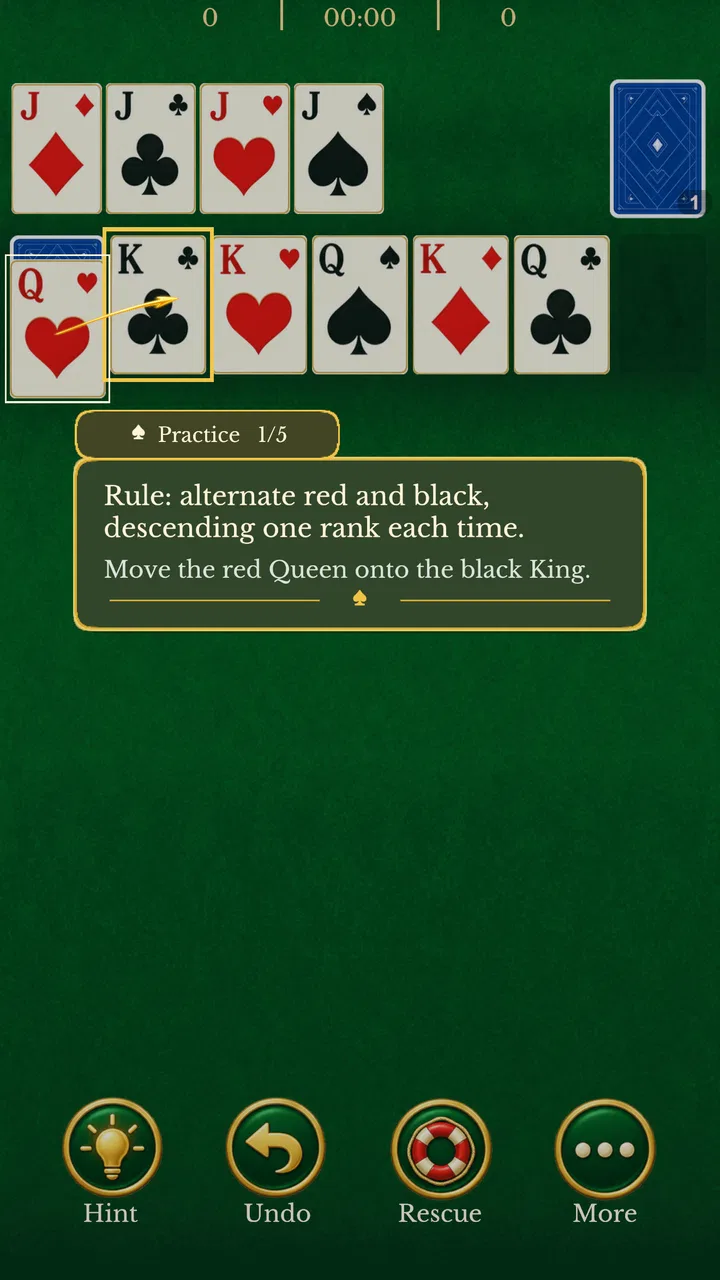
The biggest advantage for readability is that Solitaire already has a visual language many players know. I can identify the stock, waste pile, tableau, and foundation areas by their position and function instead of learning a completely new board. That familiarity is particularly helpful for anyone who prefers predictable screens or needs a little more time to interpret new interfaces.
The game’s short name, “My Solitaire,” also sets an accurate expectation. It does not present itself as a broad collection of unrelated card modes. I open it expecting a personal, classic Solitaire session, and the Joker moves, themes, and daily challenges fit around that central activity. This focused design makes navigation feel less mentally demanding than an app that places several game modes, social menus, and reward systems on the same screen.
One practical habit helped me keep the board readable: I treat each turn as a small scan rather than tapping quickly. I first check the face-up cards, then the available foundation moves, and only afterward consider the stock. That workflow is useful when the cards are visually busy or when I am playing in a less comfortable setting. It also reduces accidental moves, because I am not reacting to the first card that catches my eye.
Themes are more than decoration
Custom themes are a welcome touch because the background and card presentation affect how easily I can separate the playing area from the surrounding screen. I would not choose a theme only because it looks attractive. I would choose the one that gives me the clearest contrast between the cards and the table, especially during a longer session.
This is one of the less obvious strengths of the game: a theme can change the visual workload even when it does not change the rules. A subdued design may be more comfortable in a dark room, while a brighter, cleaner presentation may be easier to follow during the day. I recommend trying the available looks at the beginning instead of leaving the first choice in place automatically. The best theme is the one that lets the cards stand out without making the screen feel harsh.
That said, a theme cannot solve every readability issue. Decorative changes are helpful only when the card faces themselves remain clear. Anyone who relies heavily on large type, strong contrast, or specialized display settings should test the game on their own device before deciding whether it is comfortable for extended play. My experience is that the familiar board helps, but comfort still depends on the phone, screen size, and personal vision.
Daily challenges add structure without changing the basic rhythm
The daily challenge feature gives the game a useful entry point when I do not want to decide what to play. Instead of opening Solitaire and facing an undefined amount of free time, I can use the day’s challenge as a small objective. This works well for a short break because it gives the session a beginning and an obvious reason to stop.
I also like the way this can support a consistent routine. A player who enjoys checking in during a commute, after lunch, or before bed can make the challenge part of that habit. The trade-off is that daily challenges may make the game feel more task-oriented than a completely open-ended Solitaire app. If I only want an unstructured, no-pressure hand, I can ignore that feature and return to the regular game instead.
For readers wondering whether the game is suitable for someone who has never played Solitaire, I would say yes, provided they are comfortable learning through the card layout. The rules are recognizable enough to make experimentation possible, and the Joker option can soften the frustration of an early mistake. I would still introduce it slowly to a new player: explain the goal, show how cards are moved, and let them discover the pace without rushing through the first hand.
Motor, sensory, and situational considerations
I like that Solitaire lets me pause between moves, so a brief interruption does not demand the quick reactions that many games do. In practice, comfort also depends on how steadily I can hold the phone and whether tapping individual cards feels reliable; a table or two-handed grip may help when I’m studying several columns. Those everyday conditions matter as much as the game’s relaxed pace, but they do not remove every accessibility concern.
Why the slow pace can be physically forgiving
Solitaire naturally allows pauses, which makes it more forgiving than a game that demands rapid reactions. I can stop to inspect the board, put the phone down, or resume after an interruption without losing the whole experience. That is valuable for players who find fast tapping uncomfortable or who need to make decisions at their own pace.
The Joker moves also have an important practical effect. They are not merely a novelty; they can reduce the need to repeatedly search for a narrow solution when the tableau becomes awkward. Used carefully, a Joker can keep a session moving after an error or an unlucky arrangement. I would not spend one automatically, though. Saving it for a genuinely blocked position makes it more useful and preserves the feeling that my choices still matter.
For people with limited dexterity, the key question is not whether Solitaire is slow enough in theory, but whether the individual card movements feel dependable on their phone. I found that deliberate taps are preferable to hurried gestures. Holding the device securely, keeping the play area unobstructed, and using a stable surface can make a bigger difference than trying to play quickly. The game’s classic structure supports a careful style, but each player should judge the touch response in practice.
Sound and visual stimulation deserve personal testing
My Solitaire is a visual card game first, so it suits me when I want something quiet and self-contained. That makes it a reasonable choice in places where spoken dialogue, constant animation, or competitive pressure would be distracting. I can focus on the arrangement of cards and use the game as a gentle mental break.
However, visual simplicity should not be confused with universal sensory comfort. Card symbols, suit colors, theme backgrounds, and any movement associated with a card action may affect players differently. Someone sensitive to bright screens may prefer a calmer theme and a lower device brightness. Someone who distinguishes suits mainly by color should pay attention to whether the card symbols remain easy to tell apart rather than relying on color alone.
A useful test is to play one short hand in the exact place where the game will usually be used. A bright living room, a dim bedroom, and an outdoor bench create very different viewing conditions. If the cards are easy to follow only when the screen is held at one precise angle, that is a warning sign for regular use. I would rather discover that before building the game into a daily routine.
One-handed play is possible in the right context, but not always ideal
A phone-based card game is naturally tempting for one-handed sessions. I can imagine using it while waiting for an appointment or sitting on public transport, when the other hand is occupied. Yet the most comfortable approach depends on how much of the tableau I need to inspect. Holding the phone in one hand may work for a quick move, but a two-handed grip is safer when I am studying several columns or trying to avoid a mis-tap.
This is an important trade-off for people with limited reach or those who often play while carrying something. My Solitaire is well suited to short, seated sessions where I can position the device properly. It is less suitable when I need to keep moving, divide my attention, or operate the phone from an awkward angle. The game is calm, but calm gameplay does not remove the physical demands of holding a small screen.
How it fits real everyday situations
My most convincing use case is a ten-minute waiting period. I can open the game, complete a few moves, pause when my name is called, and return later without needing to remember a complicated storyline. The daily challenge gives that brief session a little purpose, while the standard Solitaire format keeps the mental effort manageable.
It also works for a quiet evening when I want something more engaging than scrolling but less demanding than a strategy game. I can switch themes to make the board feel less repetitive, then use a Joker only if the hand becomes genuinely frustrating. That combination gives me control over the intensity: the rules stay familiar, but the session does not have to feel identical every time.
I would be more cautious about recommending it during a commute where the phone is constantly moving. A train ride with frequent bumps, or a crowded bus where I need to hold a rail, is not the ideal setting for careful card placement. In that situation, an audio-first app or a game with larger, simpler interactions could be a better choice. My Solitaire benefits from attention, even though it does not demand speed.
Where the inclusive experience still has limits
I see the game’s approachable rules and calm tempo as meaningful strengths, though they cannot guarantee that every player will find the card faces comfortable to read or easy to tap. A familiar format may reduce the learning curve, yet individual needs around vision, dexterity, and screen presentation still deserve a real test on the device. With that distinction in mind, I can judge where this inclusive approach works well and where another kind of game may be a better fit.
Familiarity helps, but it is not the same as full flexibility
The game’s strongest inclusive quality is its low conceptual barrier. I do not need to understand a fictional world, memorize a long sequence of controls, or compete against another person. That makes it approachable for casual players, older users who already know Solitaire, and anyone looking for a predictable activity.
At the same time, a familiar card layout can create its own barrier. Players with low vision, color-vision differences, or difficulty distinguishing small symbols may find the board more demanding than someone with typical vision. I would not assume that knowing Solitaire automatically makes every card easy to identify. The right question is whether the particular device and theme provide enough separation between suits, ranks, and card positions.
There is also a cognitive trade-off in the Joker system. A Joker can make the game more forgiving, but it adds another decision to a format that some people choose precisely because it is uncomplicated. New players may need a moment to understand when using one is worthwhile. My advice is to treat it as a reserve tool rather than part of every turn. That keeps the classic logic intact while giving the player an escape route.
Who should choose it, and who should look elsewhere?
I would recommend this game to someone who wants a free, familiar Solitaire experience with a few personal touches. It is especially suitable for short breaks, relaxed solo play, and players who appreciate daily goals without needing a social layer. The Everyone age rating also makes it broadly approachable as a family-friendly card game, although individual comfort with small-screen controls still matters.
I would skip it if your main reason for downloading a card game is online competition, a large variety of card modes, or a deep progression system. My Solitaire is focused rather than expansive. A more feature-heavy alternative may be better for someone who wants multiplayer matches, elaborate collections, or a constantly changing set of rules. Likewise, if you need highly specialized readability controls, I would test this game carefully before relying on it as your main card app.
Compared with a basic Solitaire app, the Joker moves give this version a little more forgiveness, and the themes make the board feel more personal. Compared with a broad card-game collection, it is less distracting and easier to enter. That middle position is its identity: more flexible than a barebones clone, but deliberately simpler than a platform built around many modes and systems.
Practical details before installing
The game is free, which removes the usual upfront cost barrier for someone who only wants to try a few hands. It is currently at version 2.2 and requires Android 6.0 or later, so compatibility is worth checking if the phone is older. I would install it on the device I actually plan to use, because screen size and touch accuracy affect the experience more than the basic rules might suggest.
Misiona Puzzle has kept the product focused on its card-game purpose. That focus is reassuring for a player who does not want to navigate a complicated entertainment hub, but it also means the value depends on whether classic Solitaire itself holds your attention. The daily challenge and themes help with variety, yet they do not transform the game into something fundamentally different.
One final tip is to decide in advance how you want to use the Joker. If I spend it whenever a move looks inconvenient, the game becomes too easy and the satisfaction of solving a difficult tableau fades. If I reserve it for a position where normal planning has left me stuck, it becomes a useful accessibility and frustration-management tool. That small personal rule makes the game feel more balanced.
My inclusive verdict after regular play
My Solitaire succeeds because it respects the reason people return to Solitaire: the rules are familiar, the pace is under my control, and a short session can be satisfying without demanding my full evening. The custom themes and daily challenges add variety, while Joker moves offer a practical way to recover from a difficult board. Those details are modest, but they make the classic format more welcoming to casual players.
From an inclusive point of view, I see a game that supports different contexts better than it supports every individual need. Its pause-friendly rhythm, low pressure, and simple objective are genuine strengths for players who prefer calm interaction. Its main barriers come from the realities of a small visual card layout and touch-based play. Those are not reasons to reject it automatically, but they are reasons to test the presentation on your own phone.
I would personally recommend it to a friend who wants a dependable, free card game for waiting rooms, quiet breaks, or relaxed evenings. I would explain that the Joker should be used thoughtfully, that the clearest theme may be better than the prettiest one, and that one-handed play is most comfortable when the phone is stable. Those small choices make the experience more readable and less tiring.
In the end, the game is best understood as a polished-feeling take on familiar Solitaire rather than a complete card-gaming destination. Its 4.7 average and more than 10K installs show that it has found an audience, but the decision to keep it should come from your own playing habits. If you value clarity, quiet solo play, and a few useful twists, My Solitaire is worth trying. If you need extensive accessibility customization, multiplayer energy, or many different card games in one place, another option will likely serve you better.
FAQs for My Solitaire-Card Game
01What is My Solitaire-Card Game, and how is it played?
My Solitaire-Card Game is a mobile card game focused on classic solitaire-style gameplay, usually based on arranging cards into foundation piles by suit and in ascending order. Players typically build descending sequences in alternating colors, reveal hidden cards, and use the stock and waste piles strategically. The app is designed for short, relaxing sessions and may include different layouts, scoring options, and difficulty settings.
02Can I play My Solitaire-Card Game without an internet connection?
In most cases, solitaire games are designed to work offline, allowing you to play when traveling, commuting, or using the app where there is no reliable connection. However, some features may still require internet access, including advertisements, cloud synchronization, leaderboards, online challenges, analytics, or downloading additional content. It is worth opening the game once while connected before relying on offline play.
03Does My Solitaire-Card Game contain advertisements or in-app purchases?
The availability of advertisements and purchases depends on the version of My Solitaire-Card Game installed on your Android or iOS device. Many free solitaire apps display ads between games or during menu navigation, while an optional purchase may remove advertising or unlock extra themes and features. Before downloading, review the store listing and purchase details carefully, especially if children use the device.
04What features and customization options does the game offer?
My Solitaire-Card Game may include useful options such as multiple card designs, table backgrounds, left- or right-handed layouts, sound controls, hints, undo functions, statistics, daily challenges, and different scoring systems. The exact selection can vary by platform and app version. Players who enjoy personalization should check whether the game supports adjustable difficulty, portrait or landscape orientation, and progress tracking.
05Is My Solitaire-Card Game suitable for beginners and older players?
Yes, solitaire is generally easy to learn and suitable for beginners, casual players, and older users who prefer a calm puzzle experience. Clear card symbols and familiar rules make the basic gameplay accessible, while hints and undo tools can reduce frustration during difficult rounds. Nevertheless, users should check text size, contrast, touch responsiveness, and accessibility settings, as these can differ between devices and versions.
Pros
- Simple rules make it easy for beginners to start playing.
- Offline play lets you enjoy games without mobile data.
- Quick rounds are convenient for short breaks.
- Smooth card controls make moving cards feel natural.
- Multiple layouts provide variety beyond standard Solitaire.
Cons
- Frequent ads may interrupt play
- especially between rounds.
- Some features may require in-app purchases to unlock.
- Limited social options make it less appealing for competitive players.
- Hints can reduce the challenge for experienced Solitaire players.
- Performance may vary on older phones or tablets.

My Solitaire-Card Game
Gallery